


TokenCat is a local-first CLI that shows how your AI coding agents use tokens across one machine, and optionally across trusted machines on your LAN.
Run tokencat to get a terminal dashboard for Codex, Claude Code, Gemini CLI, GitHub Copilot Chat/Agent, and GitHub Copilot CLI. TokenCat reads the telemetry files those tools already keep locally; it does not proxy requests, rewrite endpoints, read credentials, or print prompt and response bodies.
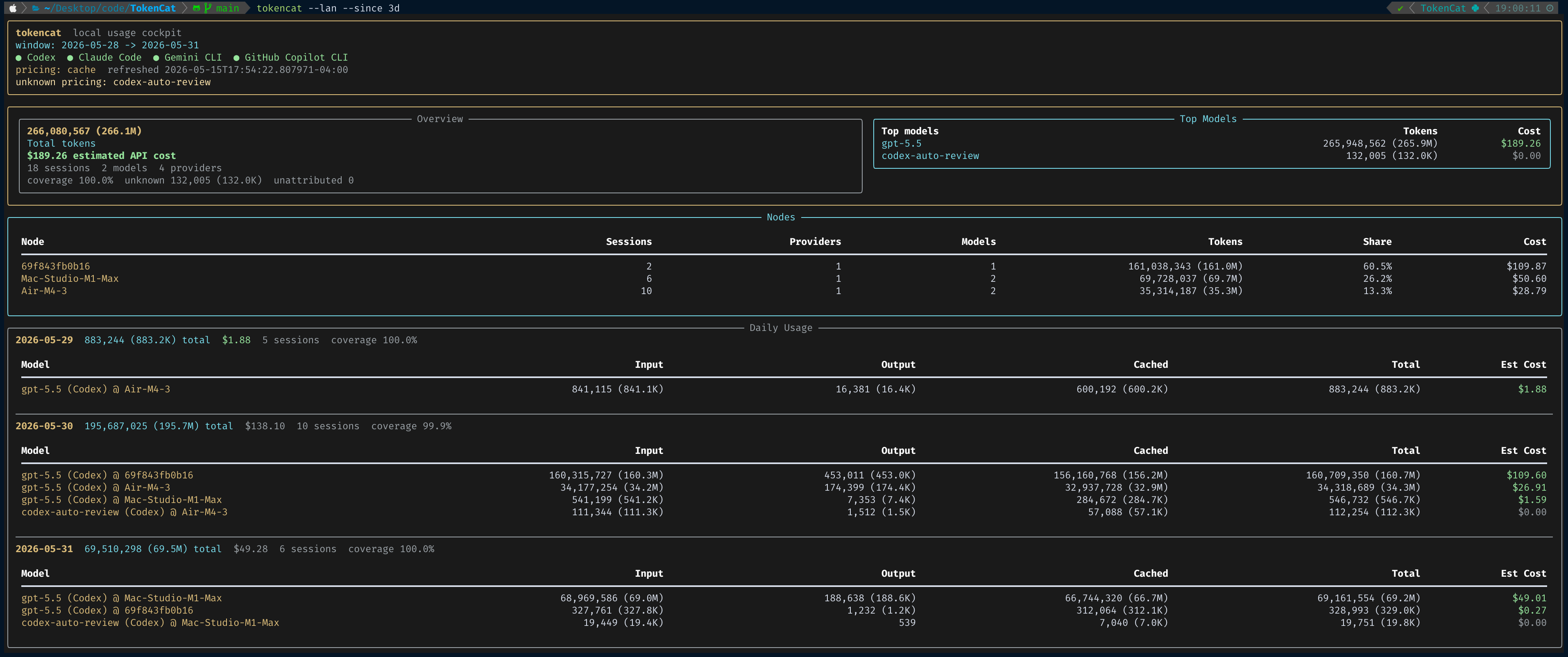
- One dashboard for several coding agents: Codex, Claude Code, Gemini CLI, VS Code Copilot Chat/Agent, and Copilot CLI.
- Zero-provider setup for normal use: install it and run
tokencat. - Privacy-first scanning: local files only, anonymous session IDs by default, no OAuth/session token reporting.
- Cost estimates with clear coverage: bundled pricing works offline, and unknown models stay visible instead of being guessed.
- Useful terminal views: dashboard, sessions, models, daily usage, doctor, pricing, and JSON output for scripts.
- Multi-machine rollups: trusted TokenCat nodes can be aggregated with
--lan, including SSH snapshot hosts from~/.ssh/config.
TokenCat requires Python 3.9 or newer.
pipx install tokencatUpgrade later with:
pipx upgrade tokencatTo try a checkout of this repository:
pipx install .Open the default 7-day dashboard:
tokencatLook farther back:
tokencat --since 30d
tokencat --since 2026-01-01
Check what TokenCat can see on this machine:
tokencat doctorTokenCat can roll up trusted machines without sending prompts or responses. Each node exposes or returns a read-only snapshot.
SSH-configured machines and containers do not need a long-running HTTP server. If a host appears in ~/.ssh/config and has tokencat available remotely, tokencat nodes --trust can add it as an SSH snapshot node. Later, tokencat --lan runs ssh <host> tokencat snapshot --json and aggregates the returned snapshot.
Aggregate trusted nodes:
tokencat dashboard --lan
tokencat summary --lan
tokencat sessions --lan
Remove trusted nodes:
tokencat nodes --removeYou can also start an HTTP node on another machine:
export TOKENCAT_NODE_TOKEN="choose-a-shared-secret"
tokencat serve --lan
tokencat serve starts in the background by default:
tokencat serve --status
tokencat serve --logs
tokencat serve --stop
For foreground debugging:
tokencat serve --lan --foregroundDiscover and trust nodes:
tokencat nodes --trustIf mDNS is blocked by Docker Desktop, VPNs, or network policy, trust a node by URL:
tokencat nodes --url http://127.0.0.1:8765 --trustFocus on one provider:
tokencat dashboard --provider codex
tokencat sessions --provider claude --limit 20
tokencat models --provider gemini
tokencat daily --provider copilot
Change the terminal theme:
tokencat --theme light
tokencat dashboard --theme dark
Use structured output:
tokencat summary --json
tokencat sessions --json --show-title --show-pathCommands with --json emit stable envelopes with:
generated_atfiltersproviderssummaryoritemswarnings
This makes TokenCat easy to pipe into local scripts, dashboards, or personal automation.
Most users do not need a config file. TokenCat discovers local agent data from the standard locations for each tool.
| Provider | What TokenCat Reads | Optional Configuration |
|---|---|---|
| Codex | ~/.codex/sessions/**/*.jsonl, ~/.codex/archived_sessions/*.jsonl, and ~/.codex/state_*.sqlite as a fallback. |
None. |
| Claude Code | projects/**/*.jsonl under the Claude config root. |
Set CLAUDE_CONFIG_DIR to one or more comma-separated roots. Without it, TokenCat checks $XDG_CONFIG_HOME/claude, ~/.config/claude, and legacy ~/.claude. |
| Gemini CLI | ~/.gemini/tmp/**/chats/session-*.json plus non-sensitive settings metadata from ~/.gemini/settings.json. |
None. |
| GitHub Copilot | VS Code `workspaceStorage//chatSessions/.json | .jsonland Copilot CLI shutdown summaries under~/.copilot/session-state//events.jsonl`. |
Common environment variables:
| Variable | Used For |
|---|---|
CLAUDE_CONFIG_DIR |
Overrides Claude Code data roots. Multiple roots can be separated with commas. |
COLORFGBG |
Helps --theme auto detect light terminals. TokenCat falls back to the dark palette when it cannot tell. |
TOKENCAT_NODE_NAME |
Sets the display name for this machine when using TokenCat nodes. Defaults to the hostname. |
TOKENCAT_NODE_TOKEN |
Default bearer-token environment variable for HTTP LAN nodes. |
Local TokenCat state is kept under ~/.tokencat/:
~/.tokencat/pricing/stores the refreshed pricing cache.~/.tokencat/node.jsonstores this machine's node identity.~/.tokencat/nodes/trust.jsonstores trusted LAN or SSH nodes.~/.tokencat/logs/node.logand~/.tokencat/node.pidare used by the detached node server.
| Command | Purpose |
|---|---|
tokencat / tokencat dashboard |
Terminal dashboard with provider health, token totals, pricing coverage, timeline, top models, and recent sessions. |
tokencat summary |
Compact totals by provider, model count, tokens, and estimated API cost. |
tokencat sessions |
Session list with anonymous IDs by default. Use --show-title and --show-path when you want local metadata. |
tokencat models |
Model-level aggregation across providers. |
tokencat daily |
Daily usage totals for the selected window. |
tokencat doctor |
Detection and health report for local providers and pricing data. |
tokencat pricing show |
Inspect catalog freshness, coverage, and unknown models. |
tokencat pricing refresh |
Refresh the user pricing cache under ~/.tokencat/pricing/. |
tokencat serve |
Start a read-only local snapshot node. |
tokencat nodes |
Discover, trust, inspect, or remove LAN and SSH nodes. |
tokencat snapshot --json |
Emit a machine-readable snapshot for remote aggregation. |
Useful flags:
--provider codex|claude|gemini|copilot
--since 7d
--until 2026-05-31
--daily | --weekly | --monthly    # dashboard usage buckets
--theme auto|dark|light
--json
--no-price
--lan
Session listings also support:
--limit 50
--model gpt-5-codex
--show-title
--show-pathTokenCat estimates API-equivalent cost when a model can be matched to known pricing data.
- Pricing works offline with the bundled catalog shipped in the package.
- On first pricing use, TokenCat silently tries to refresh a local cache under
~/.tokencat/pricing/. - If the refresh fails, it quietly falls back to the bundled catalog.
tokencat pricing refreshrefreshes the local cache manually.- Resolution is source-aware: direct source pricing first, then official API pricing for the model family, then OpenRouter as the marketplace fallback.
- JSON output includes
pricing_sourceandpricing_modelwhen a row is priced. - Unknown, renamed, redirected, or unattributed models remain visible with explicit pricing status.
Current pricing references:
- OpenAI API pricing
- OpenAI Codex pricing
- Gemini API pricing
- Anthropic models and pricing
- xAI models
- OpenRouter pricing
- GitHub Copilot plans
TokenCat is intentionally conservative.
- Reads local telemetry files only.
- Does not proxy, intercept, or replay model requests.
- Does not rewrite provider endpoints.
- Does not read OAuth/session credentials for reporting.
- Does not print raw prompt or response bodies.
- Uses anonymous session IDs by default.
- Shows titles and paths only when you pass
--show-titleor--show-path.
- TokenCat supports macOS and Linux, including typical Docker/containerized Linux environments where the relevant agent state is mounted or available locally.
- Windows is not yet supported.
- LAN discovery uses mDNS, which can be unreliable through Docker Desktop, VPNs, or restrictive networks. Use
tokencat nodes --url ... --trustor SSH nodes in those environments. - Copilot CLI usage is counted from shutdown summaries; active CLI sessions without shutdown summaries are detected but not counted yet.
- Cost is an estimate, not your actual bill.
TokenCat is licensed under GNU GPLv3. See LICENSE.