Beta version
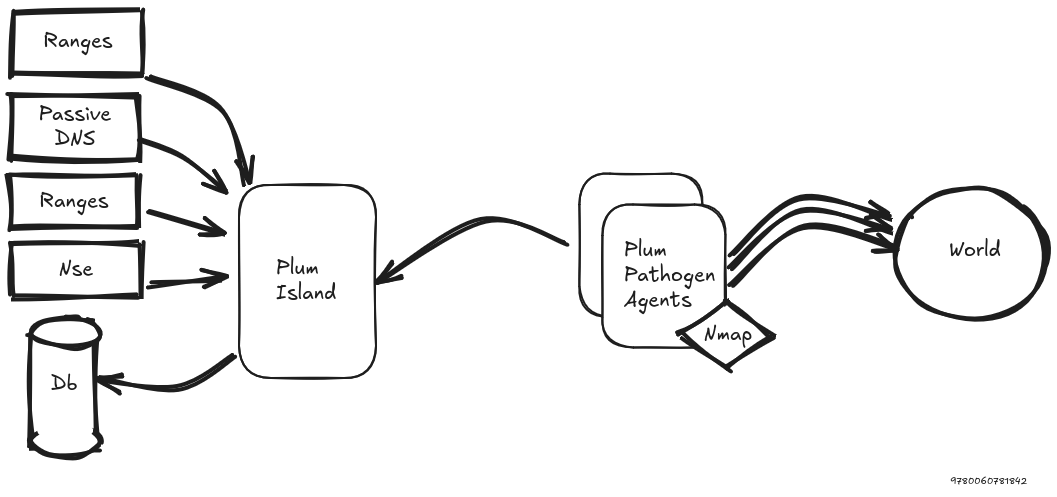
Plum Island is an orchestrator for proactive surface-exposure discovery. It assigns scan jobs to distributed agents, collects their results, stores scan history, and makes the collected data searchable through indexed technical indicators.
The project is designed for repeated monitoring rather than one-shot scans: targets can be linked to scan profiles, jobs are queued by priority, results are kept over time, and reports can summarize what changed during a period.
- Distributed scan orchestration with agents and server-side job queues.
- Target and scan profile management.
- Per-profile scan tracking for each target.
- Indexed search over IPs, networks, ports, DNS names, HTTP metadata, favicons, TLS certificates, banners, and computed tags.
- Structured query syntax with exact, prefix, substring,
AND,OR, and date-range filtering. - Tag rules that automatically add tags to matching scan documents.
- Favicon-based tagging using MD5, SHA-256, and mmhash indicators.
- Scheduled Markdown reports from the same search syntax used by the UI.
- CSV/JSON export workflows for search results.
The search index supports fields such as:
ip,net,portfqdn,fqdn_requested,domain,domain_requested,host,tldhttp_title,http_cookiename,http_etag,http_serverhttp_header,http_headvalhttp_favicon_path,http_favicon_mmhash,http_favicon_md5,http_favicon_sha256bannerx509_issuer,x509_subject,x509_san,x509_md5,x509_sha1,x509_sha256tag
Example:
domain.begin:"circl.lu" port:443 http_server.lk:nginx
See Search documentation for the full field list, modifiers, examples, and date-range behavior.
Tag rules are stored as YAML definitions and can also be managed from the web UI. Each rule contains a description, a search query, a list of tags, and a version timestamp.
Example:
description: HashiCorp Vault
query: http_favicon_mmhash:747250914 AND http_title.bg:Vault
tags:
- product:hashicorp-vault
- vendor:hashicorp
version: 20260428T170756Z
See Tagging documentation for YAML format, import/export tooling, version handling, and reindexing.
Reports use the same structured search syntax as the interactive search page. They generate Markdown summaries for a reporting interval and can be previewed, run manually, or sent on a schedule.
See Reports documentation for report configuration, interval handling, Markdown content, and SMTP delivery.
- Installation
- Migration
- Search
- Tagging
- Reports
- Scan profiles, scheduling, and priority
- Tools
- Kvrocks objects
- Python 3.10+
- Flask AppBuilder 4.8
- Meilisearch 1.22.2+
- Kvrocks unstable build 8f04af34+, with RocksDB 10.4.2+
Python package dependencies are listed in requirements.txt:
flask-appbuilder==4.8.1flask-Limiter==3.12APScheduler>=3.11.0netaddr>=1.3.0meilisearch>=0.37.0redis>=6.4.0PyYAML>=6.0.3pyfaup-rs>=0.4.9pybgpranking2>=2.0.2pyipasnhistory>=0.1nmap2json
git clone https://github.com/D4-project/Plum-Island
cd Plum-Island
./setup.sh
The setup script creates a local Python virtual environment, installs requirements.txt, creates the Flask AppBuilder admin user, and loads initial data:
- default TCP ports
- HTTP header tagging collection
- YAML tag rules from
webapp/tags/ - NSE scripts from
https://github.com/D4-project/Plum-Rules-NSE - all-target
Default banner scanprofile for TCP ports 22, 80, and 443 withbanner.nse
See Installation documentation for Meilisearch, Kvrocks, Passive DNS, Docker, and runtime configuration details.